
Auction Bid Sniper for eBay
Myibidder.comShopping
3.81.59K Reviews
- Version
- 2.2.62
- Installs
- 500.00K
- Age Rating
- Everyone
Screenshots
Our Review of Auction Bid Sniper for eBay
 Analysis by Appyee
I like the idea behind Auction Bid Sniper for eBay: prepare a bid ahead of time, then let the app submit it near the end of an auction instead of keeping the listing open and racing the clock yourself. That makes it a focused shopping tool rather than a general marketplace app. It can make eBay bidding less of a last-minute chore, though it cannot turn an uncertain auction into a guaranteed bargain. My view is that it works best when you already know what an item is worth and want help sticking to a plan.
What a snipe changes about bidding
With ordinary manual bidding, you need to be available as the auction closes, and reacting to another offer can tempt you to keep raising your limit. A scheduled final bid shifts the effort earlier: decide what you are willing to pay, set up the snipe, and avoid being pulled into a live back-and-forth. That is useful for more than convenience. It can help keep your maximum grounded in your budget rather than in the heat of competition.
It is worth remembering that a snipe is not a promise that you will win. If another bidder’s maximum is higher, or the auction’s outcome otherwise goes against you, a last-moment offer will not change that. I treat the tool as a way to submit my intended bid at a chosen moment, not as a trick for beating every competitor. If the item is common and another listing is likely to appear, walking away can still be the sensible move.
Planning a bid before the clock runs down
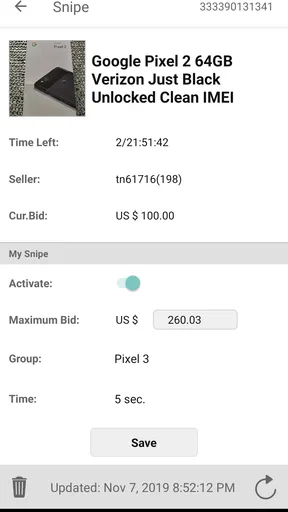
The strongest workflow begins outside the final seconds. I compare the listing with similar items, check the condition and seller details, and settle on a ceiling that includes any costs I expect to pay. Then I add the auction and enter that amount without revising it just because the countdown feels tense. The app is most useful when that decision is already made; it is less helpful if I am still figuring out whether the item is worth buying.
For a realistic example, imagine I find a used accessory I need while commuting, but the auction ends during a meeting. I can review the listing beforehand, choose a firm maximum, and arrange the bid rather than trying to open eBay at the right moment. That removes the need to watch the close. I would still check the result afterward, because setting a bid is not the same as winning or completing a purchase.
Where it fits among shopping options
Compared with bidding manually in eBay, a sniping app is mainly about timing and reducing the need to be present at the end. It does not replace browsing, judging condition, or deciding what a fair price is. Compared with simply using a watchlist or reminder, it goes further by preparing a bid for submission, but that added convenience also means I need to be comfortable connecting an auction workflow to a separate app.
If you enjoy following every bid and changing your offer as the auction develops, manual bidding may suit you better. It gives you direct involvement, even if it can encourage emotional decisions. If your priority is to set a limit and get on with your day, sniping is a more natural fit. For fixed-price shopping, neither approach is necessary: comparing available listings and buying at a listed price avoids the uncertainty of an auction altogether.
Getting Started with Auction Bid Sniper
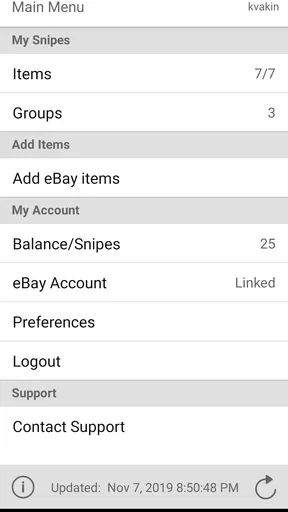
First off, setting up Auction Bid Sniper for eBay was a breeze. You just need to sync it with your eBay account, and you’re pretty much good to go. The interface is clean and straightforward, which is a relief because nobody likes fumbling around with complicated menus when you’re trying to snag a deal.
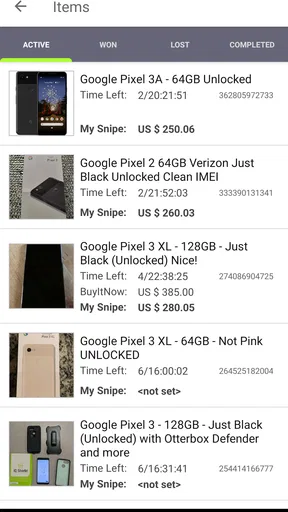
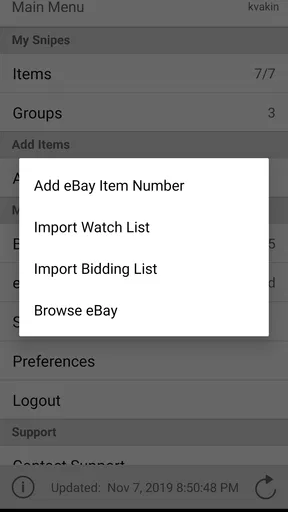
Once linked, you can start adding items to your watchlist directly from eBay or through the app. It’s smooth sailing from there, and you can easily set up your snipe bid in a matter of seconds. The app allows you to adjust the bid timing, so you can choose how close to the auction end you want your bid to be placed. I found this feature particularly handy because it lets you strategize your approach depending on how competitive the auction is.
Features That Stand Out
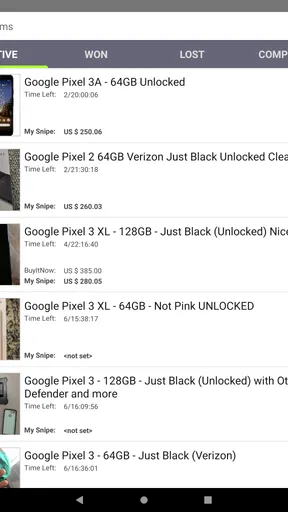
I’ve tried a few other bidding apps, but what sets this one apart are some nifty features that really cater to the eBay enthusiast. For instance, the app provides a detailed history of your previous snipes and their outcomes. This is great for tracking what works and what doesn’t. Plus, you can set up multiple snipes simultaneously, which is perfect for those days when you’re juggling several auctions.
The history can be more than a record of wins and losses. I would use it to check whether my chosen limits are realistic: repeated near-misses may mean an item is consistently selling above my budget, while wins can reveal whether I am bidding more than I need to. I would not treat a handful of results as proof of a perfect strategy, since condition and seller differences matter, but the record gives me something concrete to review instead of relying on memory.
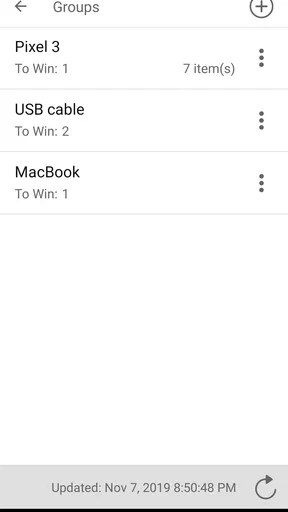
Another feature that caught my eye is the ability to group items. Say you’re bidding on similar items but only want to win one. You can group them, and once you win one, the app automatically cancels the remaining bids. It’s like having a personal assistant ensuring you don’t end up with duplicates unless you want them!
That grouping option is especially useful when several listings offer interchangeable versions of the same thing. I would group only items I genuinely consider substitutes, and I would make sure their condition and included accessories are close enough that winning any one would meet the need. If one listing is a better fit than the others, I would leave it out rather than rely on a group to make that judgement for me. The app can prevent duplicate wins in the described workflow, but the choice of acceptable alternatives still belongs to the buyer.
My Personal Take
Using the app has definitely changed the way I approach eBay auctions. Before, I’d be glued to my screen, anxiously watching the clock tick down. Now, I can set my bids and go about my day. The app’s reliability is impressive, and I haven’t faced any hiccups with the snipes not going through.
Even so, I would avoid leaving a high-stakes purchase to an untested setup. Before relying on the process for something expensive or hard to replace, I would make sure the account connection is working and that I understand how the timing controls behave. A small, low-pressure auction is a sensible way to learn the routine. This is not because every bid is likely to fail; it is simply good practice when an automated step matters to the outcome.
One thing I’d suggest to new users is to test out the timing settings with a few less crucial auctions to find your sweet spot. It’s all about finding that perfect balance between being early enough to avoid last-second internet issues and late enough to outsmart other bidders.
I would also be cautious about interpreting timing as the main source of an advantage. A later bid can reduce the time available for a bidding contest, but it cannot compensate for an unrealistic maximum or a listing that has not been checked carefully. My practical tip is to choose the item first, then choose the timing; do not let the existence of a timing control persuade you to bid on something you would otherwise pass over.
Who is likely to get the most from it
The best fit is someone who shops on eBay often enough to have several auctions to manage, but does not want to monitor each closing minute. Collectors comparing similar listings may appreciate the combination of multiple scheduled bids and grouped alternatives. Someone with a busy workday may also find it useful when an auction ends at an inconvenient time, provided they have already inspected the listing and set a sensible cap.
I would be more hesitant to recommend it to a first-time auction buyer who is still learning how bidding and listing details work. The app can organize the act of placing a bid, but it does not replace careful reading, price research, or understanding what happens if you win. A newcomer may be better off watching a few auctions and learning how final prices move before automating bids. Likewise, if you buy only occasionally, the extra setup may feel unnecessary compared with using eBay directly.
There is also a practical distinction between bidding on a clearly defined item and shopping for something where the details matter a lot. If I need a particular condition, size, included part, or other specific characteristic, I would verify each listing individually before adding it to a group. Convenience is valuable only when it does not make me careless about what I am agreeing to buy.
Account setup, cost, and everyday fit
Because the workflow connects to an eBay account, I would take a moment to make sure I am comfortable with that arrangement before adding auctions. I would also keep my login details and account security in mind as I do with any service connected to shopping. The convenience is not worth rushing through account setup, especially if I am using a device I do not normally use or am unsure which account is active.
The app is free to install, with optional in-app purchases listed from under a dollar to higher-priced items. I would start with the basic experience and only consider paying for something if I can identify a specific need it addresses. That keeps the decision tied to my actual auction habits rather than assuming every buyer needs paid extras. It is intended for everyone, and its long-running presence in the shopping category is reflected in an average rating of 3.8 from around 7,200 ratings, alongside more than 500,000 installs.
Myibidder.com develops the app, and version 2.2.62 is the current release. The app dates back to March 22, 2011, which gives it a long history as a focused auction tool rather than a new all-purpose shopping service. It supports devices running version 7.0 or later. Those details matter most if you are checking whether it fits an older device or deciding whether you want a specialist tool instead of handling every step inside eBay.
Where I would draw the line
The biggest limitation is also part of the format: the app helps with the timing of a bid, not with the uncertainty of an auction. A seller’s listing can still be a poor match, an item can attract a higher offer, and a bid can exceed what I wanted to spend if I have not set my limit carefully. I would not use a snipe as a reason to skip checking the seller, condition, delivery details, or the final amount I am prepared to pay.
It is also not the right tool when I want to negotiate, ask questions before committing, or reconsider my offer as new information appears. In those situations, a reminder and manual review may be better because I stay in control right up to the close. For a fixed-price item, a normal search and comparison is simpler. The sniper earns its place specifically when the auction format suits me and I have already made the important buying decisions.
The overall audience response is useful context, but I would not treat ratings as a guarantee that every person’s setup will behave exactly the same way. The average rating is 3.8, based on around 7,200 ratings, with roughly 1,600 written reviews. I read that as a reason to approach it as a practical specialist app with real trade-offs, not as something every eBay shopper needs.
Why You Might Love It Too
In today’s fast-paced world, convenience is king. Auction Bid Sniper for eBay saves you time and effort by automating the bidding process. Plus, it’s like having a secret weapon in your back pocket, giving you an edge over those who are manually clicking away. Whether you’re a seasoned eBay pro or just someone hunting for a good deal, this app is worth a shot.
Overall, if you’re tired of losing out on auctions due to last-minute bid wars, this app is definitely worth checking out. It does exactly what it promises, and then some, making online auctioning a whole lot more fun and stress-free. Happy bidding!
My verdict
I recommend it to regular eBay auction shoppers who already know their price limits and want to avoid sitting through every countdown. Its strongest points are the planned timing, the record of previous bids, and the option to group substitute listings when winning only one is the goal. Those tools support a more deliberate routine, particularly when auctions end while you are busy or when you are tracking several suitable items.
I would skip it if I prefer to manage every bid manually, buy mainly at fixed prices, or am not yet comfortable evaluating auction listings. It cannot tell me what an item is worth, guarantee a win, or make an unsuitable listing safe to buy. Used with a firm budget and careful listing checks, though, it is a useful, narrowly focused companion for eBay bidding rather than a replacement for good shopping judgement.
Verdict
Strengths of Auction Bid Sniper for eBay
- Automates bidding process, saving time.
- User-friendly interface for easy navigation.
- Customizable bid settings for flexibility.
- Real-time notifications on bid status.
- Supports multiple eBay accounts.
Limitations of Auction Bid Sniper for eBay
- Requires internet connection to function.
- Limited customer support options.
- Subscription needed for premium features.
- Occasional glitches in bid synchronization.
- No offline mode available.
Similar Picks in This Category
View All
SHEIN-Shopping Online
Roadget Business PTE. LTD.4.8

Amazon Shopping
Amazon Mobile LLC4.4


Mercado Libre: Compras online
Mercado Libre4.8

Wish: Shop and Save
Wish US Holdings LLC4.7

Alibaba.com - B2B marketplace
Alibaba Mobile4.4
Frequently Asked Questions
What is Auction Bid Sniper for eBay and how does it work?
Auction Bid Sniper for eBay is an app designed to help users place last-second bids on eBay auctions, often referred to as ‘sniping.’ By entering your maximum bid and scheduling it to be placed seconds before the auction ends, the app increases your chances of winning by avoiding bidding wars.
Is Auction Bid Sniper for eBay safe to use with my eBay account?
Yes, Auction Bid Sniper for eBay is designed with security in mind. It requires your eBay login credentials to place bids on your behalf, but these are encrypted and stored securely. Always ensure you download the app from a trusted source to avoid security risks.
Does using Auction Bid Sniper for eBay guarantee winning an auction?
While Auction Bid Sniper for eBay significantly increases your chances of winning by placing bids at the last moment, it does not guarantee a win. Your bid must still be the highest among all bidders. The app helps by reducing the chance of a bidding war, which can drive up the final price.
Are there any fees associated with using Auction Bid Sniper for eBay?
Auction Bid Sniper for eBay may have a subscription fee or charge per successful snipe, depending on the app version. It’s essential to check the pricing details within the app or on the app store listing to understand any costs involved before use.
Can I use Auction Bid Sniper for eBay on both Android and iOS devices?
Yes, Auction Bid Sniper for eBay is available for both Android and iOS devices. Ensure your device meets the app's system requirements and download it from either the Google Play Store or Apple App Store to ensure compatibility and receive updates.
